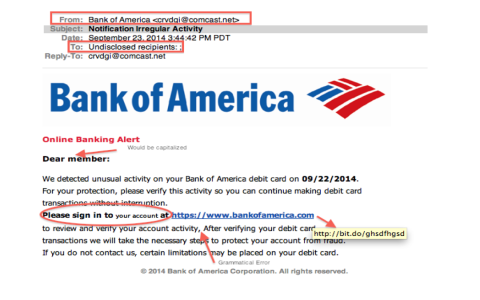
Hey everyone! Gotta share something real quick that hit my inbox this morning, and it’s a classic, but slick, phishing attempt. You know me, I always poke around with these things to see how they tick, so I figured I’d walk you through it.
The Email Arrived
It started innocently enough. I got this email with the subject line that screamed “ACTION REQUIRED: Verify Your Account Information Immediately.” Seriously, who wouldn’t open that? It looked pretty professional at first glance. It had a logo, decent formatting, the whole nine yards. They even used a font that looked like the real deal.
My first gut check was the sender’s address. It looked vaguely official, something like “service@*” or some such nonsense. But if you actually hover over it—which I always do—the actual hidden address was some gibberish from a disposable domain in Eastern Europe. That was strike one.
Diving into the Content
The body of the email claimed there was some “unusual activity” detected on my account and that I needed to verify my details or my account would be suspended within 24 hours. The sense of urgency is always their biggest weapon, right?
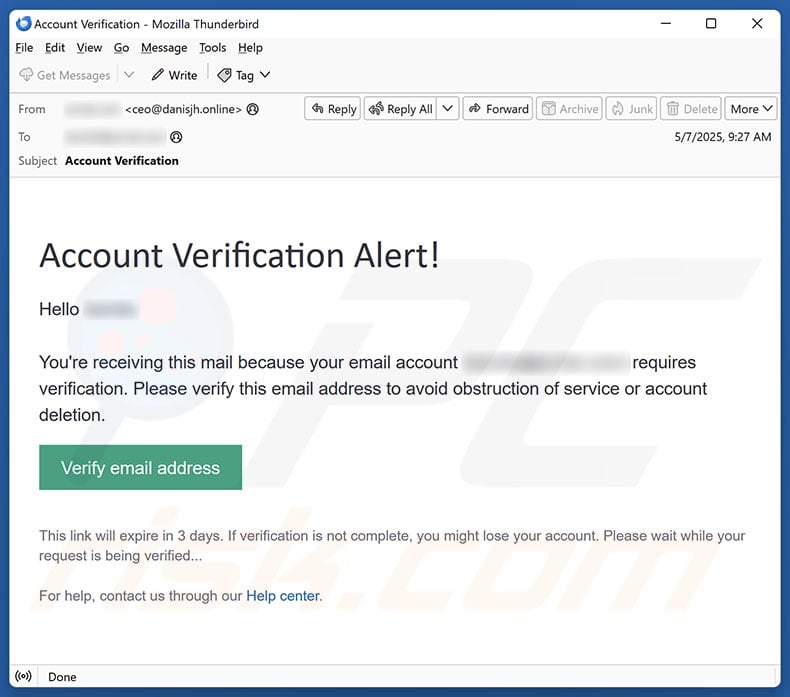
They had a big, juicy blue button that said “CLICK HERE TO VERIFY.” This is where I started the real digging. I didn’t click it, obviously. Instead, I carefully hovered my mouse right over that button, and guess what? The URL preview popped up at the bottom of my screen.
It wasn’t pointing to the actual service domain at all. It was pointing to some long, confusing string of characters hosted on an insecure HTTP site, probably a quick-spin low-cost server somewhere. That was strike two, and a major red flag.
The Sandbox Test
Now, I know some of you might just delete it, but I always take these things for a spin in a safe environment—my isolated virtual machine, totally disconnected from anything important. Curiosity kills the cat, but sometimes it trains the mouse, you know?
So, I copied the malicious URL (without clicking the button in my real inbox) and pasted it into the browser on the isolated machine. The landing page loaded up, and wow, they really put some effort into cloning the actual login page. It looked spot-on!
I examined the page source code briefly. It was sloppy HTML but effective. The entire purpose of the page was simple: capture whatever you type into the username and password fields and then redirect you to the actual legitimate site to make you think it was just a small glitch or login error.
I entered total garbage data—like “testuser” and “notmypassword”—just to see what would happen. Sure enough, the page pretended to “process” the request for a second, then immediately bounced me to the real service provider’s homepage, completely clearing the tracks of the phishing site. Smooth but predictable.
My Takeaways and What I Did Next
This whole practice only took about fifteen minutes, but it confirmed what I suspected. It’s a classic credentials harvesting scam. They bank on panic and people not checking the fine details.
What did I do right after? First, I forwarded the original email to the proper security and abuse reporting email address for the service they were impersonating. Then, I flagged it as phishing in my email provider’s system to help train their spam filters.
The key things that gave this away, and what you guys should always check, are:
- Checking the actual sender address hidden behind the display name.
- Hovering over any links or buttons to check the destination URL before clicking.
- Noticing the huge pressure to act “immediately.”
- Looking for bad spelling or grammatical errors (though this one was surprisingly clean).
Stay safe out there folks. They keep getting better at making these things look real, so keep your guard up and always verify sensitive requests through a separate channel, never just by clicking an email link.