Alright folks, another week, another deep dive into something I’ve been wrestling with. This time, it’s all about closing the loop between ad spend and actual sales ROI, specifically by hooking into HubSpot. It sounds simple on paper, right? Connect the dots, track the money. But you know how it goes in the trenches.
I started this project because my team was throwing serious cash at campaigns—Google Ads, Facebook, the works—but the reporting felt so fragmented. Google Analytics gives you one story, our CRM (HubSpot, obviously) gives you another, and trying to manually stitch that conversion data together was a nightmare. We needed a single source of truth for “Did this ad bring in real money?”
The Initial Setup Struggle: Getting Data In
The first thing I tackled was making sure our ad platforms were talking to HubSpot properly. This is where most people trip up. I mean, UTM tags are great, but they only tell you the traffic source, not the actual monetary value of the eventual deal.
My goal was specific: When a lead comes in from a paid campaign, I need that campaign and ad group ID tied directly to their contact record in HubSpot, and crucially, linked to the deal when they convert.

We ran a quick test on our main landing pages.
- I made sure that every single form submission was capturing hidden fields for the necessary parameters:
gclidfor Google,fbclidfor Facebook, plus our standard custom UTMs (Source, Medium, Campaign). - We had to tweak our form handlers. Initially, some forms were dropping the parameters because of simple JavaScript errors on submission. Spent a solid afternoon just debugging those little script hiccups. It’s always the tiny things, right?
Connecting the Ad Platform APIs
Just capturing the ID on the form isn’t enough; you need the context. We needed HubSpot to be able to look up that gclid and say, “Ah, this was Ad Set X, Campaign Y, spent Z dollars.”
I leaned heavily on the HubSpot Ads Tool integration first. It’s the path of least resistance. Connecting the Google Ads and Facebook Business accounts was straightforward—just a few clicks and authentications. Suddenly, HubSpot started pulling in cost data, impressions, and clicks, matching them up where it could.
But the real magic came when we started associating specific ads with specific deals. This required a custom workflow:
- When a contact is created with a paid campaign parameter (e.g., Source = ‘paid search’), trigger a workflow.
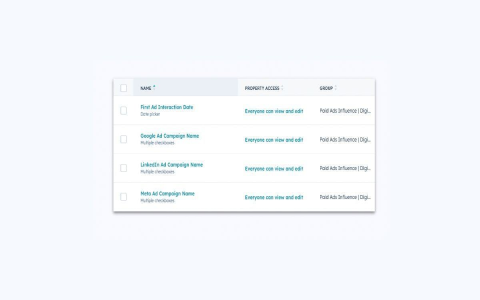
- We created a few custom properties in HubSpot: “First Ad Campaign ID,” “Last Ad Click Date,” and crucially, “Attributed Cost.”
- The workflow automatically populated these fields based on the hidden form data and the integrated Ads data.
I had a bit of a headache with attribution modeling. HubSpot has different models (First Touch, Last Touch, etc.). We decided to initially stick with the “First Touch” model for our paid efforts, but implemented a mechanism to also track the last touch if it was another paid ad, just for comparison purposes later. Took a lot of trial-and-error to structure the workflow logic so it didn’t overwrite the critical First Touch data.
The Final ROI Dashboards
Once the data pipeline was solid—from click to form submission to contact creation to deal association—the final step was the visualization. This is where you actually see the ROI.
I built out three key dashboards in HubSpot’s custom reporting tools:
- The Campaign Efficiency Report: Shows total campaign spend (pulled from the integrated platforms) against the total closed/won revenue attributed to that campaign. This instantly highlighted which campaigns were just burning cash and which ones were monsters.
- Lead-to-Deal Time by Source: This metric was gold. It showed that leads from certain high-intent paid keywords converted into closed deals 40% faster than organic leads. Immediate win justifying increased spend there.
- Cost Per Closed Deal: Simply, the total ad cost divided by the number of deals won attributed to that spend. This is the simplest, most brutal metric for making budget decisions. If it costs us $500 to acquire a closed deal via one channel, but $5,000 via another, we know exactly where to cut.
Honestly, the whole process felt like building plumbing, but seeing that clear line connecting Ad Spend Line Item A to Closed Won Deal Value B is incredibly satisfying. It shifted our team from guessing what worked to definitively knowing.